doPDF Free PDF Converter

0 ความคิดเห็น

doPDF Free PDF Converter

ด้วย doPDF คุณอิสระสามารถแปลงเอกสาร ให้ค้นหาได้ไฟล์ PDF จากโปรแกรมใด ๆ Windows จะติดตั้งเป็นไดร์เวอร์เครื่องพิมพ์และช่วยให้คุณสร้างไฟล์ PDF ได้โดยใช้เพียงเลือก "พิมพ์" คำสั่งจากโปรแกรมใด ๆ (คุณสามารถแปลงเอกสาร Word ของคุณแผ่น Excel, PowerPoint งานนำเสนอการเขียนแบบ AutoCAD รายงานของ บริษัท , สัญญา, เวิร์กโฟลว์, สัญญา, แผนการตลาดรูปแบบรายการสินค้ารายการราคาแผนภูมิอีเมลหรือหน้าเว็บ) ส่งผลให้ไฟล์ PDF สามารถดูได้บนคอมพิวเตอร์เครื่องใดก็ได้ที่มีรูปแบบไฟล์ PDF Viewer (Reader) ที่ติดตั้ง doPDF มีจำนวนมากของคุณสมบัติที่ช่วยให้คุณ: ปรับเปลี่ยนขนาดกระดาษที่ปรับเปลี่ยนความละเอียด (72-2400 dpi), เปลี่ยนการจัดวางหน้า (ภาพภูมิทัศน์), และเปลี่ยนการตั้งค่าที่มีคุณภาพ
มีอะไรใหม่ในรุ่นนี้: 7.2.376 รุ่นถาวรที่อักขระแบบอักษรเอียงไม่ทำงานได้ดีตัวละครหมุนแทนเบ้เมื่อพิมพ์แบบ CAD (IDW, IPT, SPL)

With doPDF you can freely convert documents to searchable PDF files from any Windows application. It installs as a printer driver and helps you generate the PDF files by simply selecting the "print" command from any application (you can convert your Word documents, Excel sheets, PowerPoint presentations, AutoCad drawings, company's reports, contracts, workflows, agreements, marketing plans, forms, products list, price list, charts, emails or web pages). The resulted PDF files can be viewed on any computer with a PDF viewer (reader) installed. doPDF has a lot of features that allows you to: modify the paper size, modify the resolution (from 72 to 2400 dpi), change page orientation (portrait, landscape), and change the quality settings.
What's new in this version: Version 7.2.376 fixed where Skew font characters do not work well, the characters are rotated instead of skewed when printing CAD drawings (idw, ipt, spl).

เวอร์ชั่น : 7.2.376
ขนาดไฟล์ : 4.01MB
ประเภท : freeware
ผู้พัฒนา : Softland
ระบบปฏิบัติการ : Windows XP/Vista/7
Click to image
!!!!!

Servers Download From Download.com
Read More …

CorelDRAW Graphics Suite X5

0 ความคิดเห็น

CorelDRAW Graphics Suite X5

CorelDRAW Graphics Suite X5 เป็นชุดการออกแบบกราฟิกที่หลากหลายซอฟแวร์ที่ช่วยให้คุณสร้างสรรค์และเป็นมืออาชีพในการแสดงความคิดสำหรับสื่อใด ๆ แสดงให้เห็นถึง การออกแบบเว็บกราฟิกและภาพที่แก้ไขด้วยโซลูชั่นที่สมบูรณ์สำหรับการสื่อสาร นี้เป็นภาพ ได้อย่างง่ายดายนำเข้าและส่งออกเนื้อหาที่มีความเข้ากันได้ เร็วขึ้นกว่าที่เคยมี แม่แบบใหม่ที่ออกแบบมาอย่างมืออาชีพและวัสดุการเรียนรู้ที่น่าสนใจ สร้างด้วยความเชื่อมั่นทุกอย่างจากโลโก้ที่โดดเด่นและสัญญาณการสื่อการตลาดที่โดดเด่น, กราฟิกและภาพเคลื่อนไหว, ป้าย, wraps และอื่น ๆ ให้ความเร็วเพิ่มขึ้นการควบคุมสีที่ถูกต้องมากขึ้นและใหม่และเพิ่มเครื่องมือการออกแบบนี้ต้องมีรุ่นที่จะช่วยให้คุณสร้างการออกแบบที่พิเศษได้เร็วขึ้น
มีอะไรใหม่ในรุ่นนี้รุ่น X5 มีหลายสิบคุณสมบัติใหม่และปรับปรุงรวมทั้ง Flash ภาพเคลื่อนไหวภาพประกอบเวกเตอร์รูปแบบหน้าการแก้ไขภาพและเครื่องมือการติดตาม

CorelDRAW Graphics Suite X5 is a versatile graphic design software suite that helps you creatively and professionally express ideas for any media. Illustrate, lay out, trace, design Web graphics and photo-edit with this complete solution for visual communication. Easily import and export content with leading file compatibility. Get going faster than ever with new, professionally designed templates and compelling learning materials. Create with confidence, everything from distinctive logos and signs, to striking marketing materials, Web graphics and animations, billboards, car wraps and more. Offering increased speed, more accurate color control, and new and enhanced design tools, this must-have version helps you create extraordinary designs faster.
What's new in this version: Version X5 offers dozens of new and enhanced features, including Flash animation, vector illustration, page layout, photo editing and tracing tools.

ความต้องการของระบบ

  • Microsoft ® Windows ® 7, Windows Vista ®, Windows ® XP ที่มี Service Pack ล่าสุดที่ติดตั้ง (32 บิตหรือ 64 บิต)
  • Intel ® Pentium ® 4, AMD Athlon ™ 64 หรือ AMD Opteron ™
  • 1 GB RAM
  • พื้นที่ดิสก์ 750 MB ยาก (1 GB สำหรับการติดตั้งทั่วไปโดยไม่มีเนื้อหา) ถึง 6GB ที่จำเป็นในการติดตั้งเนื้อหาเพิ่มเติม
  • เมาส์หรือแท็บเล็ต
  • ความละเอียด 1024 x 768 หน้าจอ (768 x 1024 ใน Tablet PC)
  • ไดรฟ์ดีวีดี
  • Microsoft ® Internet Explorer ® 7 หรือสูงกว่า


เวอร์ชั่น : X5
ขนาดไฟล์ : 564MB
ประเภท : Free to try (30-day trial)
ผู้พัฒนา : Corel
ระบบปฏิบัติการ : Windows XP/Vista/7
Click to image

Serverss from corel.com
           Download Trial
Read More …

Anvi Smart Defender

0 ความคิดเห็น

Anvi Smart Defender


Anvi Smart Defenderให้การป้องกันที่มีประสิทธิภาพและสมาร์ทกับซอฟต์แวร์ที่เป็นอันตรายเช่นไวรัส, โทรจัน, แอดแวร์สปายแวร์, บอทและภัยคุกคามอื่น ๆ ด้วย Engine Smart-มันสแกนและตรวจจับภัยคุกคามเหล่านี้ได้อย่างรวดเร็ว จะเพิ่มฟังก์ชั่นการเพิ่มประสิทธิภาพระบบการทำงานที่เร็วขึ้นเครื่องคอมพิวเตอร์ของคุณและให้คุณสมบัติสแกนเพื่อปกป้องเครื่องคอมพิวเตอร์ของคุณมีประสิทธิภาพมากขึ้น  Anvi Smart Defender มีห้าโหมดการทำงาน พวกเขาจะ Scan, Cloud Scan, Guard, ระบบการเพิ่มประสิทธิภาพและปรับปรุง ฟังก์ชั่นการสแกนขึ้นอยู่กับภัยคุกคามที่รู้จัก กับการปรับปรุงฐานข้อมูลรายวันของมันสามารถตรวจจับภัยคุกคามใหม่ล่าสุดเพื่อปกป้องเครื่องคอมพิวเตอร์ ของผู้ใช้จากภัยคุกคามมัลแวร์ มี Cloud สแกนเป็นฟังก์ชั่นที่โดดเด่นของ Anvi Smart Defender ซึ่งช่วยให้ผู้ใช้ตรวจสอบไฟล์ที่ไม่รู้จักหรือที่น่าสงสัยเกี่ยวกับคอมพิวเตอร์

มีอะไรใหม่ในรุ่นนี้รุ่น RC2 รวมถึงการปรับปรุงต่อไปนี้:

  • ภาษาอิตาลีและเวอร์ชั่นภาษาจีนเพิ่ม
  • โดยอัตโนมัติดาวน์โหลดฐานข้อมูลล่าสุดเมื่อโปรแกรมทำงาน
  • สแกนเนอร์และการเพิ่มประสิทธิภาพของเครื่องยนต์กำจัด
  • เพิ่มอัตราการตรวจจับมัลแวร์
  • การป้องกันแบบเรียลไทชาญฉลาดมากขึ้น
  • สแกนอัตโนมัตมีเสถียรภาพมากขึ้นการสแกน
  • แก้ไขสำหรับฐานข้อมูลที่ไม่ปรับปรุงอย่างถูกต้อง
  • แก้ไขสำหรับข้อผิดพลาดที่ผิดพลาดของโปรแกรมลงครึ่งหนึ่งในระหว่างการสแกน


Anvi Smart defender delivers smart and powerful protection against malicious software, such as virus, Trojans, adware, spyware, bots and other threats. With the Smart-Engine, it scans and detects these threats fast and lightly. It adds system optimization function to speed up your PC and provides cloud scan feature to protect your PC more effectively.

Anvi Smart Defender has five function modules. They are Scan, Cloud Scan, Guard, System Optimization and Update. The Scan function is based on known threats, with the database update daily, it can detect the latest threats in order to protect users' PC from malware threats. Cloud Scan is a featured function of Anvi Smart Defender, which help users verify unknown or suspicious files on computers. With a simple "Cloud Scan" button, it will scan the most commonly infected areas of computer, and users could select to upload them to Anvi Online Cloud Server for verification. Guard is the most need function of an anti-malware program. It provides real-time protection when users surf on the Internet, such as chat online, online transaction, bank check, browser website, etc. System Optimization is an assisting function of Anvi Smart Defender. Its goal is to help users speed up PC and gain new PC feeling. In Anvi Smart Defender, the Update Center is easy-to-use, users can check for the latest malware database and latest program version by one-click, and users also can set automated update in Settings.

What's new in this version: Version RC2 includes the following improvements:

  • Italian language and Chinese language version added.
  • Automatically download latest database when program runs.
  • Scanner and removal engine enhancement.
  • Increase malware detection rate.
  • More intelligent real-time protection.
  • More stable cloud scan engine.
  • Fix for database not updating properly.
  • Fix for error that program crash halfway during scanning.
เวอร์ชั่น : RC2
ขนาดไฟล์ : 31.27MB
ประเภท : freeware
ผู้พัฒนา : Anvisoft
ระบบปฏิบัติการ : Windows XP/Vista/7
Click to image

Serverss from download.com
Read More …

Hotspot Shield

0 ความคิดเห็น

Hotspot Shield

Hotspot Shield ออนไลน์และช่วยให้คุณเข้าถึงข้อมูลที่คุณต้องการ การเข้าถึงถูกบล็อกบริการเช่น Facebook, YouTube, Twitter, Skype ในประเทศที่อินเทอร์เน็ตจะถูกเซ็นเซอร์ ให้แฮกเกอร์จากการขโมยข้อมูลส่วนบุคคลขณะที่ผู้ใช้กำลังใช้งานในอินเตอร์เน็ตเกี่ยวกับสถานที่สาธารณะเช่น Starbucks เลือกดูอินเตอร์เน็ตเอกชน
มีอะไรใหม่ในรุ่นนี้: 2.24 เวอร์ชันคือการปล่อยการบำรุงรักษา

Hotspot Shield protects you online and lets you access the information you need. Access blocked services like Facebook, YouTube, Twitter, Skype in countries where the Internet is censored. Keep hackers from stealing personal information while users are browsing the Internet on public locations like Starbucks. Browse the Internet privately. Hotspot Shield does all of this without collecting, let alone making use of, any information on your personal identity.
What's new in this version: Version 2.24 is a maintenance release.

เวอร์ชั่น : 2.24
ขนาดไฟล์ : 6.66MB
ประเภท : freeware
ผู้พัฒนา : AnchorFree
ระบบปฏิบัติการ : Windows 2000/XP/Vista/7
Click to image
!!!!!

Servers Download From anchorfree.com
Read More …

RoboForm

0 ความคิดเห็น

 RoboForm

RoboForm ทำให้การเข้าสู่เว็บไซต์และกรอกแบบฟอร์มได้เร็วขึ้นง่ายขึ้นและปลอดภัยมากขึ้น RoboForm จะจดจำระหัสผ่าน และปลอดภัยแกการเก็บชื่อผู้ใช้แต่ละคนและจะบันทึกรหัสผ่านครั้งแรกที่คุณเข้าสู่เว็บไซต์ โดยอัตโนมัติ  จะ ลดขั้นตอนการกรอกข้อมูลด้วยตนเองจากการเข้าสู่บัญชีออนไลน์ใด ๆ ด้วย RoboForm คลิกเพียงครั้งเดียวจะนำทางไปยังเว็บไซต์ที่ให้ใส่ชื่อผู้ใช้และรหัสผ่านของคุณและคลิกปุ่มส่ง การที่กรอกลงทะเบียนที่ยาวหรือรูปแบบการชำระเงิน เพียงคลิก RoboForm จะทำการกรอกข้อมูลให้คุณโดยที่คุยไม่ต้องทำอะไรเลย ช้วยประหยัดเวลาให้คุณได้มากขึ้น

RoboForm makes logging into Web sites and filling forms faster, easier, and more secure. RoboForm memorizes and securely stores each user name and password the first time you log into a site, then automatically supplies them when you return. RoboForm's powerful Logins feature eliminates the manual steps of logging into any online account. With just one click RoboForm will navigate to a Web site, enter your username and password and click the submit button for you.

Completing long registration or checkout forms is also a breeze. Simply click on your RoboForm Identity and RoboForm fills-in the entire form for you. You no longer need to remember all your passwords. You remember one Master Password, and RoboForm remembers the rest. This allows you to use stronger passwords, making your online experience more secure. RoboForm uses strong AES encryption for complete data security.

The all new RoboForm 7 comes with Chrome and Safari browser support, iPhone/iPad and Android support, as well a brand new RoboForm Everywhere license for use on unlimited computers and mobile devices.
What's new in this version: Version 7.7 is a bug-fixing release.


เวอร์ชั่น : 7.7
ขนาดไฟล์ : 11.82MB
ประเภท : freeware
ผู้พัฒนา : Siber Systems
ระบบปฏิบัติการ : Windows 95/98/Me/2000/XP/Vista/NT
Click to image


Servers Download From siber.com


RoboForm works with these platforms and browsers

     >>> see all download click mee !! 


Read More …

CCleaner

0 ความคิดเห็น

CCleaner

CCleaner คือการเพิ่มประสิทธิภาพระบบฟรีแวร์, ความเป็นส่วนตัวและเครื่องมือทำความสะอาด มันลบไฟล์ที่ไม่ได้ใช้จากระบบของคุณให้ Windows ทำงานได้เร็วขึ้นและเพิ่มพื้นที่ดิสก์ นอกจากนี้ยังทำความสะอาดร่องรอยของกิจกรรมออนไลน์ของคุณเช่นประวัติอินเทอร์เน็ตของคุณ นอกจากนี้จะมีการทำความสะอาดรีจิสทรีโดดเด่นอย่างเต็มที่
  มีอะไรใหม่ในรุ่นนี้: 1643/03/15 เวอร์ชันได้เพิ่มตัวเลือกในการทำความสะอาดเฉพาะไฟล์ที่ Recycle Bin ลบเกินกว่า 24 ชั่วโมงที่ผ่านมาและปรับปรุงการทำความสะอาดประวัติความเป็นมาของ

Firefox CCleaner is a freeware system optimization, privacy and cleaning tool. It removes unused files from your system allowing Windows to run faster and freeing up valuable hard disk space. It also cleans traces of your online activities such as your Internet history. Additionally it contains a fully featured registry cleaner. What's new in this version: Version 3.15.1643 has added option to only clean Recycle Bin files deleted more than 24 hours ago and improved Firefox History cleaning.

เวอร์ชั่น : 3.15.1643
ขนาดไฟล์ : 3.42MB
ประเภท : freeware
ผู้พัฒนา : Piriform
ระบบปฏิบัติการ : Windows 2000/XP/Vista/7
Click to image


Servers Download from Fliehippo.com
Servers Download from Download.com
Servers Download from Piriform.com
Read More …

Avira Free Antivirus

0 ความคิดเห็น

Avira Free Antivirus

หากคุณไม่ได้ป้องกันไวรัส คอมพิวเตอร์ของคุณจะติดเชื้อมัลแวร์ในไม่กี่นาที Avira Free Antivirus 2012 มีการป้องกันขั้นพื้นฐานไวรัสเวิร์ม, โทรจัน, rootkits, แอดแวร์และสปายแวร์ที่ได้รับการทดลองและทดสอบกว่า 100 ล้านครั้งทั่วโลก ในกรณีของการติดไวรัส การลบไวรัสก็เป็นไปได้อย่างง่ายดายมากและซ่อมแซมระบบโดยอัตโนมัติ
ฟังก์ชั่น: AntiVir หยุดไวรัสทุกชนิ AntiAd / สปายแวร์ป้องกันสปายแวร์แอดแวร์และ; AntiRootkit ตรวจพบรูทคิทที่ซ่อน; QuickRemoval ลบไวรัสทันทีที่กดปุ่ม; สนับสนุน NetbookSupport สำหรับคอมพิวเตอร์ที่มีความละเอียดต่ำ; AHeADTechnology ตรวจพบไวรัสที่ไม่รู้จัก


If you don't have virus protection, your PC will be infected with malware in a matter of minutes. Avira Free Antivirus 2012 offers basic protection against viruses, worms, Trojans, rootkits, adware, and spyware that has been tried and tested over 100 million times worldwide. What's more, it is available free-of-charge. It not only protects against these types of malware, but offers as well, in case of an infection, the possibility of removing viruses very easily and repair the system automatically.
Functions: AntiVir stops all kinds of viruses; AntiAd/Spyware protects against adware and spyware; AntiRootkit detects hidden rootkits; QuickRemoval removes viruses at the push of a button; NetbookSupport support for computers with low resolution; AHeADTechnology detects even unknown viruses by their profiles; AviraSupport there for you in person when questions arise.


เวอร์ชั่น : 12.0.0.849
ขนาดไฟล์ : 79.05MB
ประเภท : freeware
ผู้พัฒนา : Avira
ระบบปฏิบัติการ : Windows 7/XP 64-bit/32-bit/Vista 32-bit/64-bit
Click to image


Servers from download.com
Read More …

Malwarebytes Anti-Malware 1.60.1

0 ความคิดเห็น

Malwarebytes Anti-Malware

Malwarebytes Anti-Malware รวมเทคโนโลยีใหม่ที่ออกแบบมาเพื่อทำลายและป้องกันการติดเชื้อจากมัลแวร์ Malwarebytes Anti-Malware เป็นโปรแกรมที่ง่ายต่อการใช้งาน ป้องกันมัลแวร์ที่มีอยู่ในทั้งสองรุ่นฟรีและ PRO รุ่นฟรีจะรู้จักกันดีสำหรับการตรวจสอบและความสามารถในการกำจัดของมันและรุ่น PRO ใช้เทคโนโลยีการป้องกันขั้นสูงเพื่อช่วยหยุดการติดเชื้อมัลแวร์ นอกจากนี้ Malwarebytes มีโฮสต์ของสาธารณูปโภคเสริมเช่นเดียวกับที่ทุกคนเข้าถึงเพื่อช่วยให้คุณต่อสู้กับมัลแวร์ที่มีอยู่
มีอะไรใหม่ในรุ่นนี้รุ่นนี้จะแก้ไขข้อบกพร่องต่างๆจาก 1.60


Malwarebytes Anti-Malware combines powerful new technologies designed to seek out, destroy, and prevent malware infections.
Malwarebytes Anti-Malware is an easy-to-use anti-malware application available in both a Free and PRO version. The Free version is well-known for its detection and removal capabilities, and the PRO version uses advanced protection technologies to proactively stop malware infections. Additionally, Malwarebytes offers a host of extra utilities as well as an approachable forum community to help you combat any piece of malware that exists in the wild.
What's new in this version: This version fixes several bugs from 1.60


เวอร์ชั่น : 1.60.1
ขนาดไฟล์ : 9.06MB
ประเภท : freeware
ผู้พัฒนา : Malwarebytes
ระบบปฏิบัติการ : Windows 2000/XP/2003/Vista/Server 2008/7
Click to image

Servers from download.com
Read More …

YouTube Downloader ดาวน์โหลดวิดีโอจาก YouTube ฟรี

0 ความคิดเห็น

YouTube Downloader

YouTube Downloader ช่วยให้คุณดาวน์โหลดวิดีโอจาก YouTube ได้แก่ HD และ HQ วิดีโอ, Facebook, VEVO และนับสิบเว็บไซต์วิดีโออื่น ๆ และแปลงให้เป็นรูปแบบวิดีโออื่น ๆ โปรแกรมใช้งานง่าย - เพียงแค่ระบุ URL สำหรับวิดีโอที่คุณต้องการดาวน์โหลดและคลิกที่ปุ่มดาวน์โหลด โปรแกรมนี้ยังช่วยให้คุณสามารถแปลงวิดีโอที่ดาวน์โหลดสำหรับ iPod, iPhone, PSP, โทรศัพท์มือถือ, Windows Media, Xvid และ MP3, หรือเล่นวิดีโอที่คุณได้ดาวน์โหลดไว้ก่อนหน้านี้หรือแปลง
YouTube Downloader อินเตอร์เฟซที่มีรูปแบบแท็บสำหรับการดาวน์โหลดได้ง่ายแปลงและการเล่นและแท็บกิจกรรมใหม่ช่วยให้คุณสามารถติดตามการดาวน์โหลดและการแปลงไฟล์หลายๆอันได้ในเวลาเดียวกัน YouTube Downloader สามารถใช้ได้ในภาษาอังกฤษ, อาหรับ, บัลแกเรีย, โครเอเชีย, จีน, เช็ก, เดนมาร์ก, ดัตช์, ฝรั่งเศส, ฟินแลนด์, เยอรมัน, กรีก, ฮังการี, อิตาลี, โปแลนด์, โปรตุเกส, นอร์เวย์, โรมาเนีย, รัสเซีย, เซอร์เบีย, สโลวัก, สเปนและ ภาษาสวีเดน รุ่นพรีเมี่ยม ($ 19.90) จะปลดล็อคคุณลักษณะขั้นสูงเช่นเวลาในการดาวน์โหลดเร็วขึ้นหรือการดาวน์โหลดพร้อมกันหลายไฟล์

มีอะไรใหม่ในรุ่นนี้รุ่น 3.5 ช่วยให้ผู้ใช้เปลี่ยนชื่อไฟล์ที่ดาวน์โหลด / แปลง VEVO ดาวน์โหลด / YouTube รายการดาวน์โหลดได้รับการแก้ไข YouTube Downloader มีอยู่ในภาษาอังกฤษ, อาหรับ, บัลแกเรีย, โครเอเชีย, จีน, เช็ก, เดนมาร์ก, ดัตช์, ฝรั่งเศส, ฟินแลนด์, เยอรมัน, กรีก, ฮังการี, อิตาลี, โปแลนด์, โปรตุเกส, นอร์เวย์, โรมาเนีย, รัสเซีย, เซอร์เบีย, สโลวัก, สเปน และสวีเดน

YouTube Downloader allows you to download videos from YouTube, including HD and HQ videos, Facebook, Vevo, and dozens of other video sites and convert them to other video formats. The program is easy to use--just specify the URL for the video you want to download and click the Download button. The program also allows you to convert downloaded videos for iPod, iPhone, PSP, Cell Phone, Windows Media, XVid and MP3, or play video that you have previously downloaded or converted.
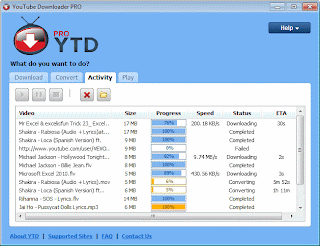
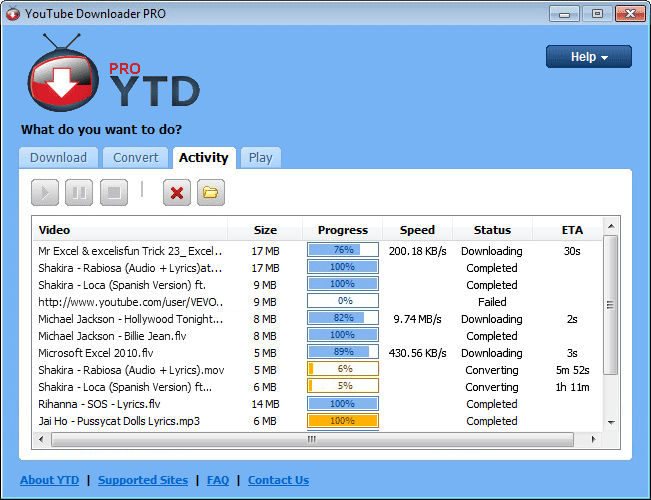
The YouTube Downloader interface includes a tabbed format for easy downloading, converting, and playing, and a new Activity tab allows you to keep track of multiple downloads and conversions in real time. The program has the ability to download full playlists as opposed to just one video. YouTube Downloader is available in English, Arabic, Bulgarian, Croatian, Chinese Simplified, Czech, Danish, Dutch, French, Finnish, German, Greek, Hungarian, Italian, Polish, Portuguese, Norwegian, Romanian, Russian, Serbian, Slovak, Spanish and Swedish. A premium version ($19.90) will unlock enhanced features such as faster download times or multiple concurrent downloads.

What's new in this version: Version 3.5 allows users to rename the downloaded/converted files. Vevo download/YouTube playlist download have been fixed. YouTube Downloader is now available in English, Arabic, Bulgarian, Croatian, Chinese Simplified, Czech, Danish, Dutch, French, Finnish, German, Greek, Hungarian, Italian, Polish, Portuguese, Norwegian, Romanian, Russian, Serbian, Slovak, Spanish and Swedish.

เวอร์ชั่น : 3.5
ขนาดไฟล์ : 5.1MB
ประเภท : freeware
ผู้พัฒนา : Biennesoft
ระบบปฏิบัติการ : Windows XP/Vista/7
Click to image


SERVER: Our own server:
Youtubedownloadersite.com


Download Sites

Download.com
Yahoo Downloads
ZDNet.co.uk
Free-downloads.net
Read More …

Avast Free Antivirus

0 ความคิดเห็น

Avast Free Antivirus

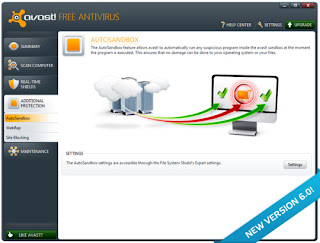
Avast Free Antivirus เต็มรูปแบบ ด้วยโปรแกรมป้องกันไวรัสเดียวกันกับและป้องกันสปายแวร์สแกนอัตโนมัต ที่ใช้ในผลิตภัณฑ์พรีเมี่ยมของเรา leaner และ meaner รุ่น 6.0 ให้ความคุ้มครองได้เร็วขึ้นกว่ารุ่นก่อนและมีส่วนขยายเบราว์เซอร์บนเว็บรวมทั้งเทคโนโลยี virtualization อัพเดตภัยคุกคามที่ถูกต้องผ่านทาง Avast CommunityIQ เทคโนโลยีให้ดาวน์โหลดหมดกังวล, ท่องเครือข่ายสังคมและการเล่นเกม - นานกว่า 170 ล้านผู้ใช้ที่ลงทะเบียน (และกว่า 130 ล้านผู้ใช้งาน)

Avast Free Antivirus is a full-featured product, with the same antivirus and anti-spyware scanning engine used in our premium products. Leaner and meaner version 6.0 provides even faster protection than its predecessor and offers a web-reputation browser extension as well as virtualization technology. Accurate threat updates via avast. CommunityIQ technology ensure worry-free downloading, surfing, social networking, and gaming--for over 170 million registered users (and over 130 million active users).
What's new in this version:

  1. Script Shield now works with Google Chrome, all versions of Firefox and Acrobat Reader
  2. Improvements in WebRep plugins (especially IE)
  3. Stability improvements in aswSP.sys and the avast! sandbox
  4. File system shield: improved on-close scanning
  5. Web Shield and Script Shield: more options in the UI
  6. Added in-product avast! Market
  7. Various other security and stability related fixes


เวอร์ชั่น : 6.0.1367
ขนาดไฟล์ : 61.23MB
ประเภท : freeware
ผู้พัฒนา : AVAST Software
ระบบปฏิบัติการ : Windows XP/Vista/7

Click to image


Servers from download.com
Read More …
 
WELCOME TO MY PARADISE © 2011 DheTemplate.com & Main Blogger. Supported by Makeityourring Diamond Engagement Rings

You can add link or short description here